A custom home builder got tired of software built for everyone, so we built theirs
A custom home builder needed software shaped around how it really runs, because the tools it tried did a little of everything and none of it well. So we built Boss HQ, and you can click through a version of it yourself. Go break it.
- Client
- A custom home builder
- Industry
- Residential custom home building (cost-plus)
- What we built
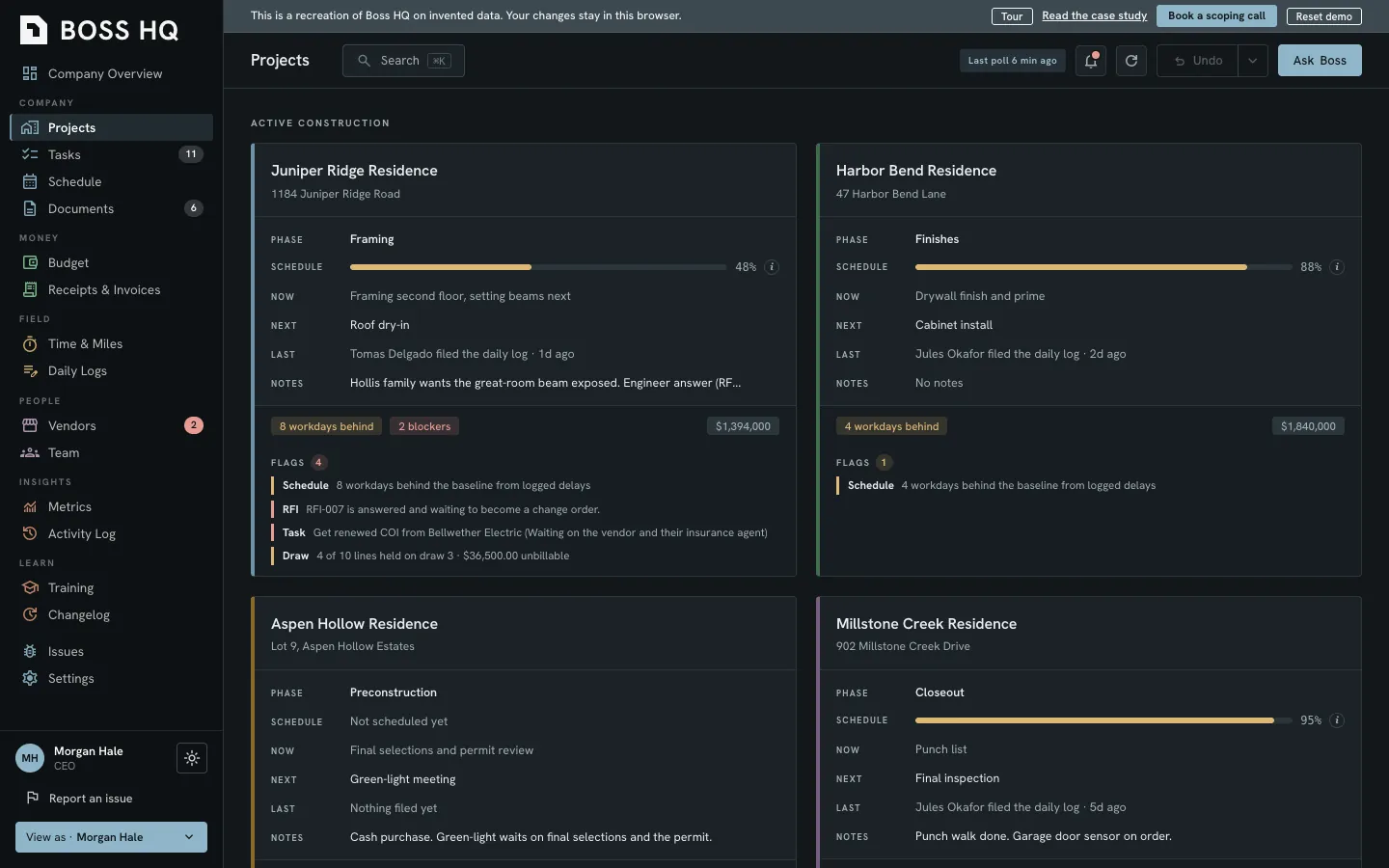
- Boss HQ, an operations platform for jobs, budgets, purchase orders, change orders, draws, vendors, schedules, documents, and more
- Stack, in plain words
- A web app, a Telegram bot, and a Claude assistant, all writing to one shared core, running on the builder's own Cloudflare account, with Google Drive holding the files. A read-only homeowner portal is built to read from that same core
- Ownership
- The builder owns the code
- Doneand in daily use
- 5loops, and every module serves one of them
- 0files deleted during the cleanup
The company
This builder makes custom homes on a cost-plus basis, which means the homeowner pays the real costs of the build plus a fee on top. That only works if the budget is showing what's actually being spent, house by house and vendor by vendor. Otherwise you can't answer the first question a homeowner has. Where does my house stand? It's a simple question. It can be harder to answer than it sounds.
The problem
A custom home builder runs on loops that general software was never drawn around. The team here tried a task manager first and then an all-in-one construction platform, and each one did a little of everything and none of it well, because tools like these are built to fit a wide range of contractors and leave a cost-plus custom builder with a rough fit. Neither one was built around how this builder runs, so a great deal of the real work, from budgets to vendor paperwork to draws, was carried by hand, outside the software, by a capable team making the most of what existed.
Here's where the software and the work didn't line up:
The pattern was the same each time, because the tools offered plenty of features while the work kept happening around them, since none of the features they had matched how this builder actually works. The work went around the software because the software didn't fit the work.
The decision
So the builder decided to build its own, shaped around how the company actually operates, with Kaizn as the guide.
We started by listening to how the company runs, and what we heard came down to five loops:
- Houses move through phases.
- Money moves through draws.
- Commitments move through documents.
- People coordinate.
- Everyone needs visibility.
Every module in Boss HQ is part of one of those loops, and if a feature didn't serve a loop we didn't build it. That's how the dead weight stayed out.
What we built
Boss HQ covers jobs, money, documents and people, and here's the list grouped by the loop each one serves.
Houses through phases.
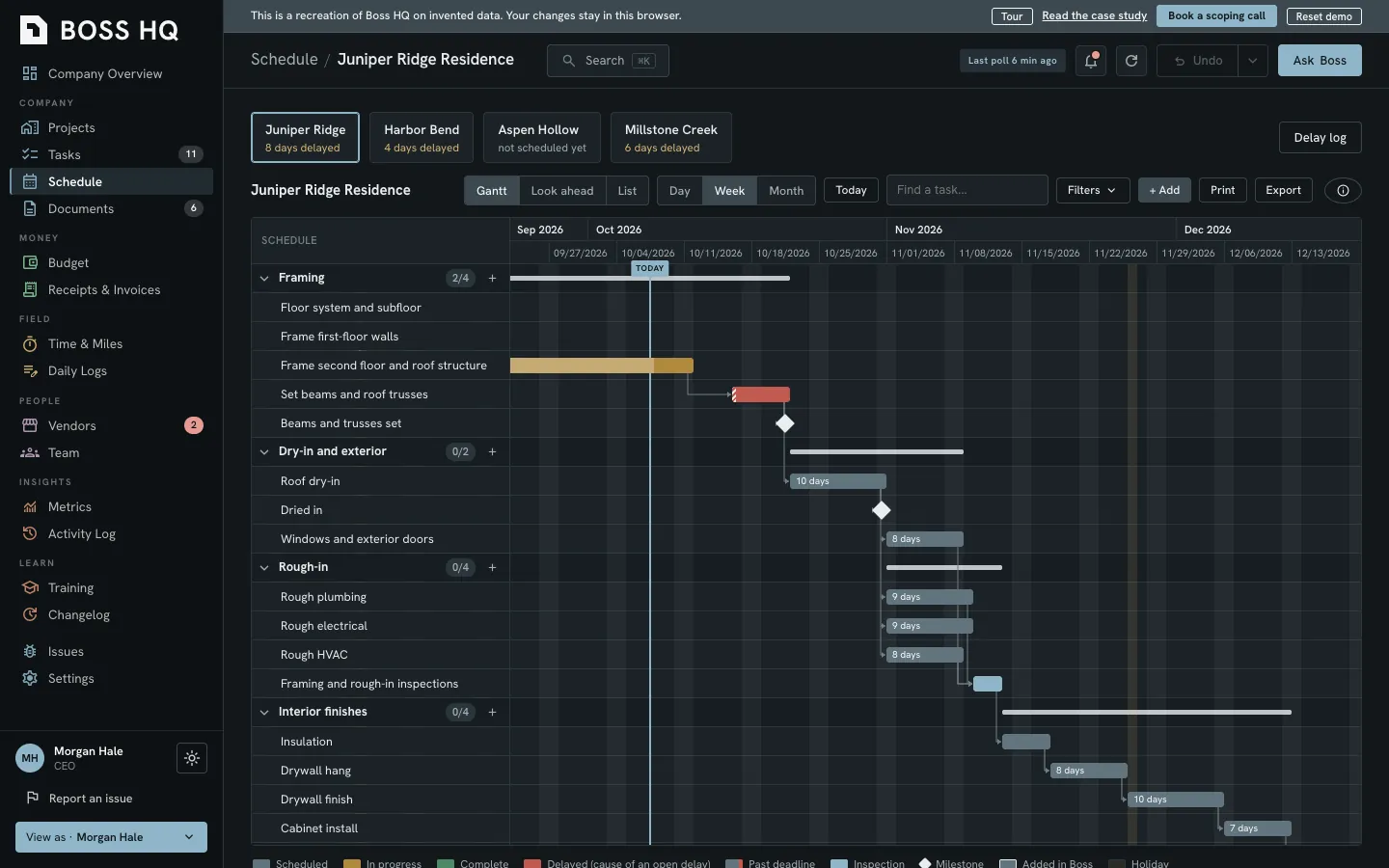
- Jobs have a registry, aliases, and a test-house sandbox where you can try things safely, and schedules have a Gantt chart you can drag and extend, dependencies that reschedule whatever follows, and calendar views.
- We built the Gantt engine ourselves, because the off-the-shelf libraries lock auto-scheduling and critical path behind a paywall, and we weren't about to pay rent on a calendar.
- Daily logs are one per person per day, and tasks can carry a Blocked status.
Money through draws.
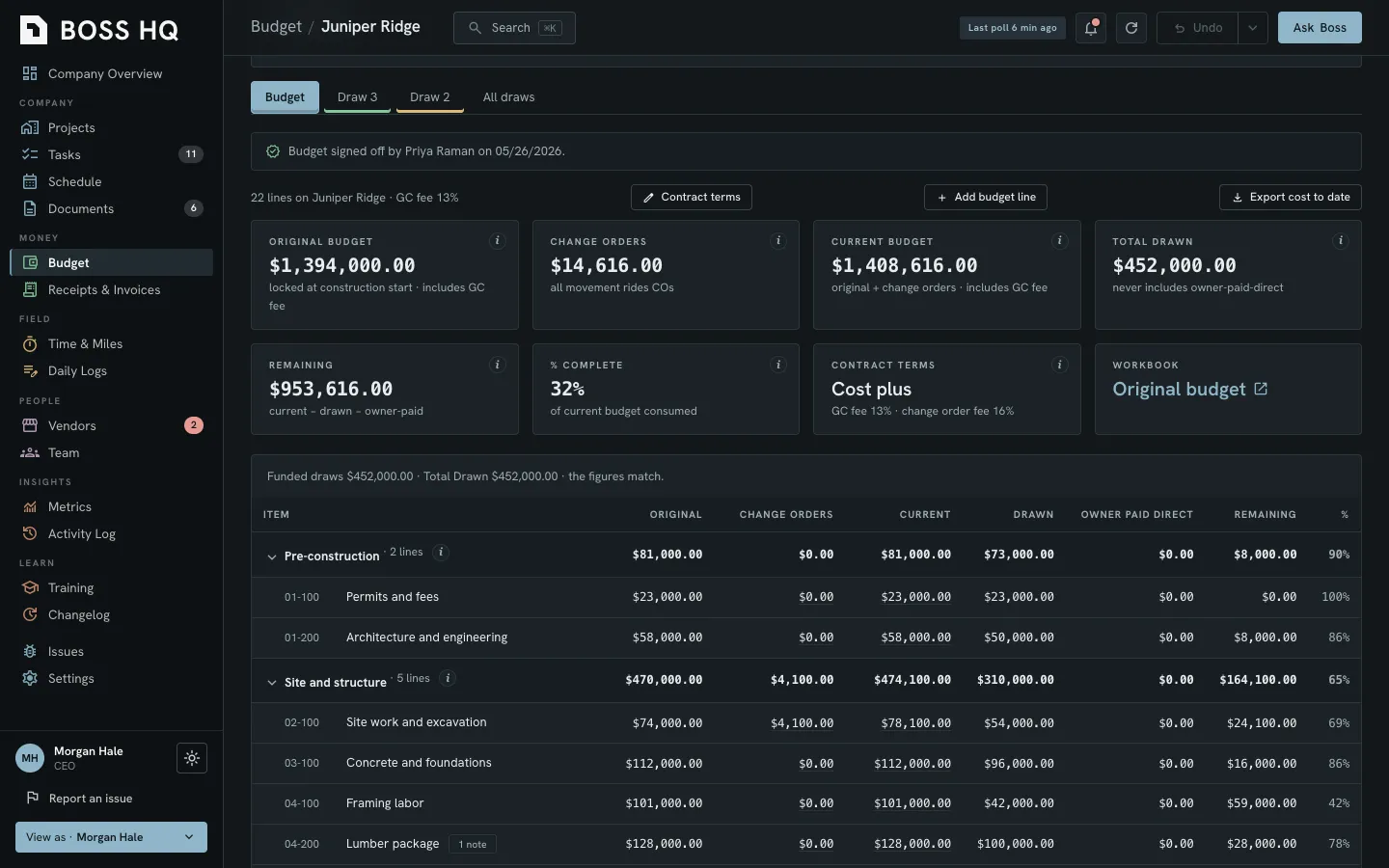
- The original budget locks at construction start and every line has a cost code, so if a line runs over, you'll see a warning and the work keeps going.
- Receipts carry a cost code and land on that job's budget line, and time and mileage have to go through a supervisor approval queue. One button opens and closes a draw, closing one opens the next, and each vendor has one lien waiver per draw.
- Metrics can track delay attribution, response time, draw cycle time, and work in progress.
Commitments through documents.
- A purchase order starts from one estimate, gets built as a PDF, and is filed in Drive, and change orders and estimates sit right beside it, and the estimate intake has a reader that captures an estimate's stated exclusions.
- RFIs have their own module, and an answered RFI can turn into a change order with one button.
- Vendors and compliance can track licenses, insurance, W-9s and master agreements, and a lapsed certificate flags the vendor with a warning that shows on the vendor and again in the draw at pay time. The team can request the missing documents or override it.
- Documents are linked to Google Drive, and a delete keeps a reason and moves the file to a holding folder.
Coordination.
- A Telegram bot answers when it's tagged and asks for a Yes before it acts, so the team can lean on it right in their group chat, and a Claude assistant looks up jobs, budgets, logs and tasks whenever someone asks.
- There are SOPs and training tracks with completion tracking, and an always-present "Report an issue" button sits at the bottom right and works even on open modals.
Visibility.
- Roles set who can do what, and anyone on the team can issue a purchase order or raise a change order.
- There's also a read-only homeowner portal built on the same core, so a homeowner can see where the house stands and which milestones are done without having to call.
How the modules connect
This is where building your own pays off, because nothing in Boss HQ is an island and it's all wired together. Here's the wiring.
- A receipt has a cost code, and then it lands on that job's budget line.
- An estimate becomes a task, then a purchase order, and the purchase order links to the vendor bills that were filed against it.
- An RFI can convert to a change order, the change order moves the budget, and if it adds days it pushes the schedule.
- A lapsed vendor certificate flags the vendor with a warning, and the warning shows again in the draw at pay time, where the team can request the missing documents or override it.
- Time and mileage have a Billed toggle that leadership sets on each entry.
- The web app, Telegram, and Claude all write through one core, so the answer is the same wherever you ask. The homeowner portal is built to read from that core.
One rule holds the money side together: the CEO is the only one on the team who submits a draw and marks it paid.
The migration
The old system held jobs, tasks, vendor and client accounts, documents, comments, and daily logs, and every kind of record had to land in the right place.
Then we had to move what mattered. Here's how that went:
- Schedules have come over for every live job, and the page shows the date of the last pull.
- Budgets are imported under a contract. Every line has a catalog cost code, and a replace won't go through once the job has draws or a locked budget.
- Estimates were extended by the exclusion loader, and it didn't refuse a single one.
- Vendor compliance documents were matched to vendor accounts, and they now sit against those accounts. Matching used the old system's id first, then the exact name, then the normalized name.
A migration's only as good as its rules, so records that fit a rule moved in with the rule applied and records that broke one were refused with the reason logged. Nothing wrong got in quietly.
The Google Drive cleanup
While we were in there, we fixed the other half of the problem, since the team was filing into a look-alike folder right next to the real one. That's how good files end up in the wrong place.
We built a structure with eight top-level folders and a project template, we set the access rule to "folder membership is permission," and we wrote a naming law for each document type. Then we copied the files, and here's how we did it:
- We copied, and we never moved. Thousands of regular files, the PDFs, photos and spreadsheets, were copied byte for byte, and the originals haven't been touched.
- We deleted nothing. The originals weren't edited either.
- We had reviewers go first. Nine reviewer agents went over the migration scripts and found four serious bugs before a real file was copied, so those bugs died in review and didn't reach a client's folders.
A later sweep took two weeks of one person's files and checked each one by its fingerprint against a full index of the main shared drive. It found most of those files were already in place.
How we built it
The method matters as much as the product. Here's how it works.
Two adversarial reviewers check the work before it ships. One looks for what's wrong. The other tries to break it.
Owners test each function first. The person who lives with a function in daily work is the one who tries it first, so nobody's relying on something its owner hasn't tried.
It runs on the builder's own Cloudflare account, and the builder owns the code. That's also why the demo you can click through is a from-scratch recreation with invented data, since the real code and the real records belong to the builder. We can't show you those.
What changed
Here's what Boss HQ gives the team:
- It's done and in daily use. Boss HQ is used every day by the builder's team.
- Jobs, money, documents and people share one place. A receipt, a change order, a vendor certificate and a schedule date are all in the same system, and they point at each other.
- Costs land on budget lines. Every receipt has a cost code, and that's what puts it on the right budget line.
- Vendor compliance has data behind it. Certificates and compliance documents sit against vendor accounts, so a lapsed certificate has something to flag.
- The draw has a home. One button opens it, each vendor's lien waiver shows in it, any open packet tasks are listed at submit, and the CEO is the only one on the team who submits it and marks it paid.
- Each function was tried first by its owner. The person who lives with a function in daily work tested it before anyone relied on it.
Want one built around how your company runs?
If a spreadsheet, a pile of tools, and a few channels are standing in for the system you need, we'd like to talk.