Inbox Zero with Claude.

Teach Claude to write your email like you, customized based on who you're emailing.

Every weekday morning it sorts your inbox, clears the noise and drafts the replies. You read each one and press send.

Full course. 10 lessons. $27.

Fix my inboxNot blown away? Get a full refund within 14 days.

For people who live in Gmail or Microsoft 365 Outlook and already tried AI on their email.

You already tried using AI on your email.

But it just made slop.

Getting it to work takes more time than just doing it yourself.

Your inbox is a landfill with a notification badge. Let's fix that.

The setup is what you're missing. So this course is the setup: one step at a time, on your own accounts. Just follow some simple steps and Claude does the building.

Real people.

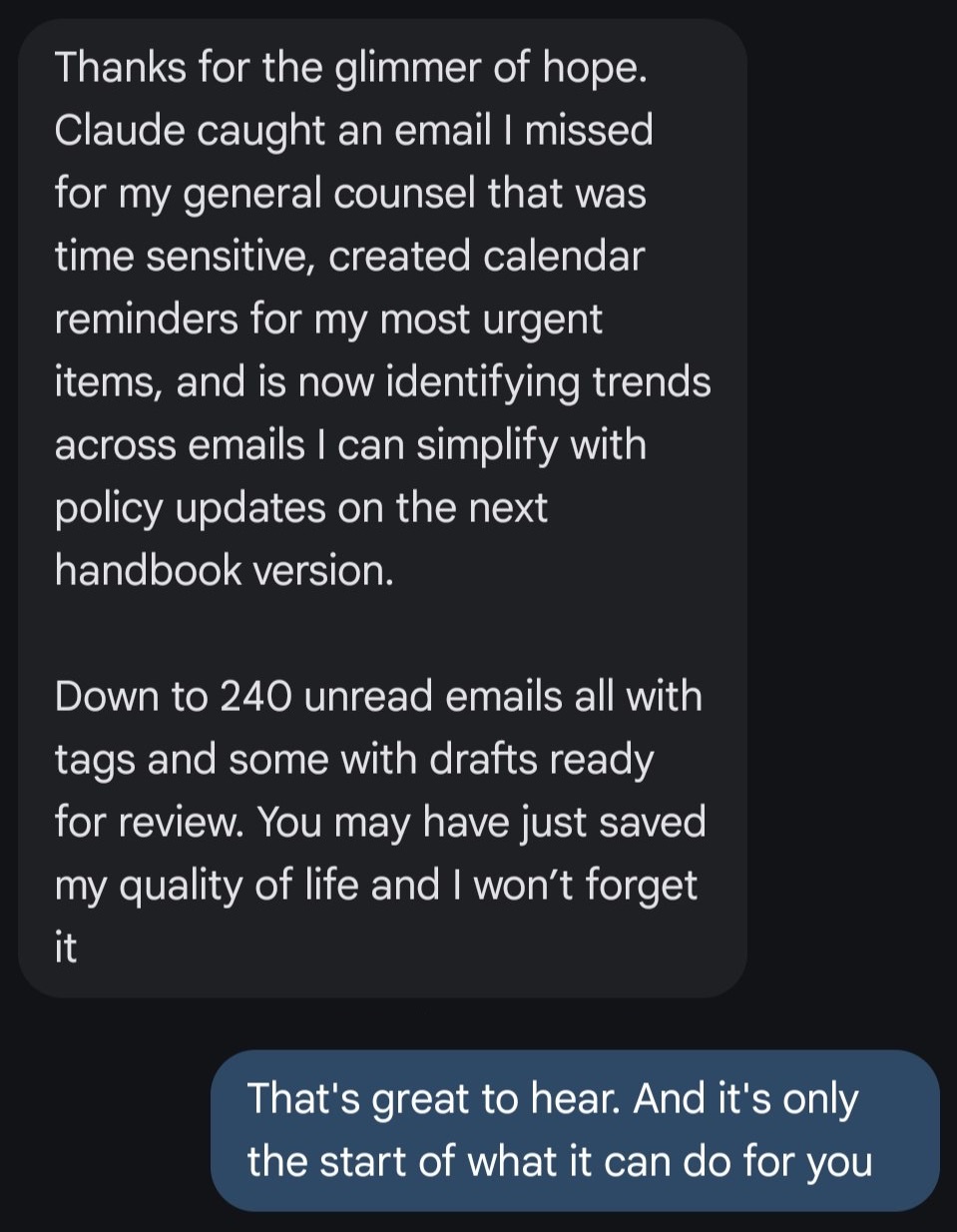
Text message from Tegan N. Last sentence: You may have just saved my quality of life and I won't forget it

You may have just saved my quality of life and I won't forget it

Tegan N.Went from 480 unread emails to 240 after a foundational Claude setup.

It's given me a professional, fully-functioning directory without the headache, and I couldn't be happier.

Briana A.Bri's Trusted Trades

Josh built a website for my real estate business that clearly shows people what I do and lets me update it and track my leads just by talking with Claude.

Ricardo D.Buy With Ricardo

Small steps. No terminal.

1

Get the course.

Lesson 1 checks you have what you need.

2

Claude learns you.

Claude reads your 50 most recent sent emails and writes down how you write.

3

Claude drafts. You decide.

Every weekday morning Claude sorts your inbox and drafts a reply for mail that needs one.

Josh Cross

I guarantee you're going to love this.

If it doesn't blow you away, or you want a full refund for any reason, you'll get one.
Just email [email protected] by the end of day 14.

Ten short lessons. So you can do it in one sitting.

  1. 1Know what you need before you start.
  2. 2Claude set up the safe way, training off.
  3. 3Talk to Claude instead of typing.
  4. 4Claude knows who you are.
  5. 5What another AI already knows about you, brought over.
  6. 6Your email connected, sending blocked.
  7. 7Claude writes like you.
  8. 8Your mail sorted, replies drafted.
  9. 9It runs every weekday morning.
  10. 10Know what to do at your limit.

Lessons 6 to 9 have fix-it lists for snags you may hit, like an Access blocked message.

You open your email and the night's mail is already sorted.

An example of a finished triage. Claude sorts each message, lists what needs you today, and drafts replies in your voice. You read and you send.

Who it's for. And who should skip it.

For you if

  • Your inbox wastes too much of your time.
  • You tried using AI to help and it sucked.
  • You can install an app and follow some steps.
  • You can pay for a Claude plan. (It's definitely worth it)

Skip if

  • You already have Claude connected to your inbox with a system you love.
  • You want to build software with code.
  • You want a free-plan setup.
  • You want Claude to send email with no check from you. (You could do this, but I don't recommend it).

Maybe you're thinking one of these.

It takes longer than doing it myself.

Setup is a one-time job. Then Claude sorts and drafts every weekday morning or whenever you tell it to, getting better with feedback.

Drafts don't sound like me.

In Lesson 7 Claude reads your 50 most recent sent emails and writes down how you write. You read every draft before it goes anywhere.

I don't want Claude sending email as me.

Neither do I. That's why Lesson 6 blocks it. Claude writes drafts, and you press send.

I'm not technical.

You do not need to be. The lessons show you what to click, and Claude builds the files. You write no code. You don't even need to know what a terminal is.

I'm afraid of clicking the wrong setting.

Lesson 2 takes you through it one step at a time: choose the model, turn training off, and see your usage.

You walk away with an inbox that drafts your replies in your voice.

$27

Fix my inbox

Not blown away? Get a full refund within 14 days.

  • Your email connected with send, reply, and forward blocked, so Claude drafts and you send.
  • Replies drafted in your voice, from rules you can read and change.
  • Sorting and drafting every weekday morning.

10 lessons. $27. You need a paid Claude plan, Gmail or Microsoft 365 Outlook, and a Mac or Windows computer. You keep access for a year from the day you buy, and updates are included.

Questions

Which Claude plan do I need?

A paid one: Pro or above. Plans and prices change, so check claude.com/pricing before you buy.

Will Claude send emails for me?

Not if you follow lesson 6. You block the send, reply, and forward tools. It writes drafts, and you send them.

Is my business data safe?

You set what Claude may do with your mail. Lesson 2 turns training off. Lesson 6 lets Claude read your mail and write drafts, and blocks send, reply, and forward. Check Anthropic's privacy terms for your plan, and get your owner's or IT lead's yes before you connect company accounts.

Does it work with Gmail or Outlook?

Yes, both. Outlook means a Microsoft 365 work or school account. Your administrator gives a one-time approval, and drafts wait until your administrator turns write tools on. Personal Outlook.com, Hotmail and Live accounts are not supported.

Does my computer have to stay on?

Not for the weekday run. In the cloud it runs on its schedule even with your computer off, and you can use it from your phone, browser, or the Claude app.

How do I get into the course?

Sign in with Google using the email you bought with, or with a one-time code emailed to that address.

How do I get a refund?

Email [email protected] by the end of day 14.

Josh Cross with Kai on his shoulder

Here's why I can teach this.

I'm a Claude consultant, and I built the Kaizn Academy on Claude. Here's a little bit of what else I've built in Claude.

  • Over a billion output tokens in Claude Code since June 2026.
  • An AI operating system and software that runs my own business.
  • My own MCP server with more than 60 tools on Cloudflare Workers.
  • Systems for clients, each on the client's own accounts.

Ready for an inbox that doesn't suck?

Not blown away? Get a full refund within 14 days.

Next: Claude for Busy People.

It expands on everything you do in Inbox Zero with Claude. It is coming. Email me and I'll tell you when it opens.

Email me when it opens.

PS. This is not for you if your day starts in your inbox and cleaning that mess is your favorite part of the day. Or if you already have a stellar system to manage it.