Kaizn Premium

A better memory for Claude, set up for you.

Claude has built-in memory, but it is thin. A database is the better memory. Kai Link sets one up for you ahead of time and runs things automatically.

$147 once. Never a subscription.

There’s a 14-day refund.

Your complete package, in three lines

$147 once gets you Kai Link, your memory set up where you choose, the lessons and skills that come with it, and the AI Assistant Builder. Never a subscription.

The first 20 people to get Kaizn Premium also get a 30-minute setup call with Josh, scheduled and held within 14 days of purchase.

There’s a 14-day refund.

What you get with Kaizn Premium

Claude that remembers you, without you building it.

Claude has built-in memory, but it is thin. A database is the better memory. Kai Link sets that memory up for you ahead of time, so you skip the building. Click any picture to enlarge it.

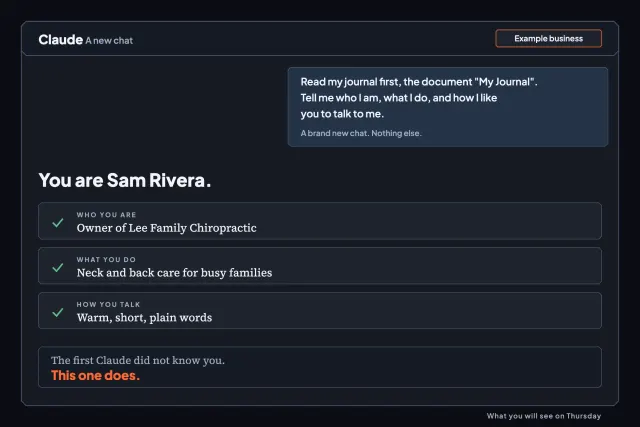
  • A brand-new Claude chat that already knows you: who you are, what you do, and how you like to talk.
    Your AI Brain

    A new chat that already knows you.

    Your info, contacts, notes, and reminders are kept in one organized place. Open a brand-new chat and it has read them, so you never start from zero.

  • Kai Link

    It sets everything up ahead of time.

    Kai Link comes with Kaizn Premium. It does the setup steps for you, keeps your place, and runs things automatically, so you do not build it yourself.

  • Inbox Zero with ClaudeGive Claude a Better MemoryFind My Forgotten SubscriptionsYour LinkedIn Outreach Map
    Lessons and skills

    What Josh has learned, ready to use.

    Through Kai Link you get the lessons Josh has learned and the skills that come with them, so you get set up quickly on your own.

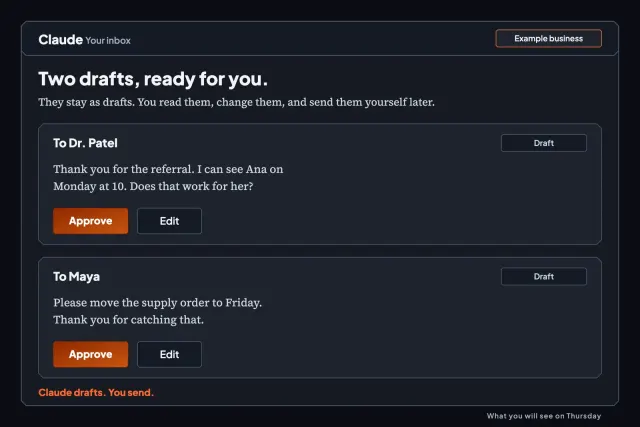
  • An example inbox in Claude: two replies written in the owner's voice, each with Approve and Edit buttons.
    Your own AI assistant

    Hand off your inbox.

    Build your own assistant on top of the memory. It sorts your email, writes replies in your voice, and lists the follow-ups you owe.

Where your memory lives

Pick where your memory lives: your computer, or Kaizn.

You choose once Kai Link is connected. Both hold the same kinds of things: who you are, your people, your conversations, reminders, notes, saved prompts, and your plan.

  • Option 1: on your own computer

    Fully private.

    Claude builds a starter folder on your computer called Kai Memory. Each folder holds a README that tells Claude exactly what goes inside, so it files everything the same way every time.

    • The more private choice: your memory is plain files that stay on your computer.
    • It works only while your computer is awake and online.
    • When Claude reads a file to answer you, that text goes into your chat with Claude, like anything you type.
    The starter folders Claude builds for you. Each README tells Claude what goes inside.
  • Option 2: inside Kaizn

    A real database.

    Your memory lives in a database that Kai Link connects to your Claude. Search is better, and every device you use shows the same thing.

    • The better memory: search finds what you saved, and a note you save on your laptop is there on your phone.
    • It does not depend on one computer being on.
    • Your private details are encrypted at rest. The exact list is below.
    Example with made-up information. Search finds a note, and your phone shows the same one.
Pick Kaizn if you want the best memory.

You get a real database with better search, on every device, whether or not your computer is on.

Pick your own computer if privacy comes first.

Your memory stays as plain files on your machine. It works only while that computer is awake and online.

What is private in Kaizn, exactly.

Encrypted at rest

Your About Me, notes, contacts, the conversations you log with them (touches), and reminders are encrypted at rest. That means they are stored scrambled, not as plain text.

Not encrypted

Questions and feedback you send us are not encrypted, and we read them. Leave private details out of them. A contact’s stage, dates, and who it is assigned to are not encrypted either.

Kaizn has no way of reading your data.

Choose your own computer and what you save stays in your folder, on your machine.

You can export your data and delete it from Kaizn. Delete your About Me yourself, and for anything else email [email protected].

From people who have worked with Josh Cross, Kaizn’s founder

What people say after working with Josh.

Kaizn AI has completely changed the way we execute our business. I can’t recommend them enough!

Alex5-star Trustpilot review

Working with Josh has been incredible. He’s always very on top of the ball and quick to answer any questions or fix bugs…

Alexander5-star Trustpilot review

I can’t express enough, how easy Josh made the process.

Danica5-star Trustpilot review

Josh helped me build an AI system in Claude, that is trained on my past, my current state, and my goals.

Aidan5-star Trustpilot review

You may have just saved my quality of life and I won’t forget it

TeganFrom Tegan, VP of HR at Manner Med Spa, after one session.

Josh built a website for my real estate business that clearly shows people what I do and lets me update it and track my leads just by talking with Claude.

RicardoBuy With Ricardo

It’s given me a professional, fully-functioning directory without the headache, and I couldn’t be happier.

BrianaRuns her directory from her phone just by saying what she wants changed.

From this review, I’m hoping you can see he works well with people who are older and/or need extra patience in the process! Highly recommend.

Roxy5-star Trustpilot review

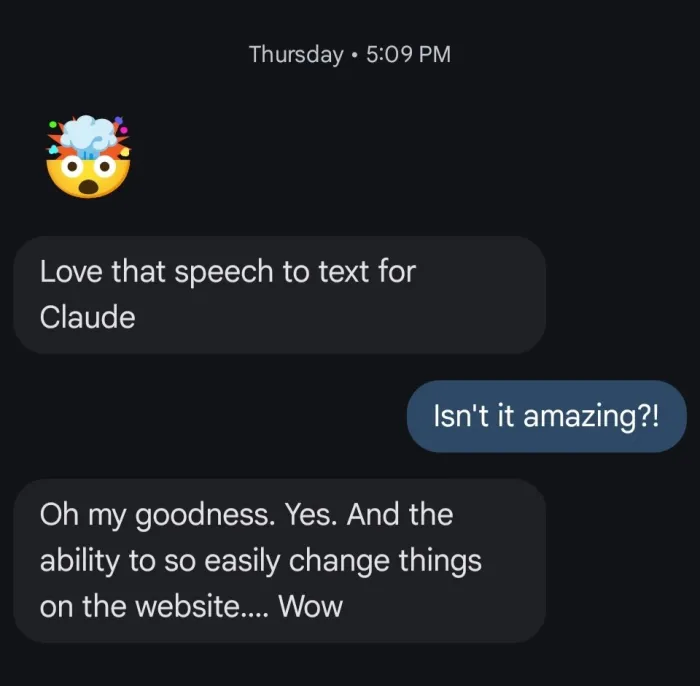
Text message from Camille. Love that speech to text for Claude. Oh my goodness. Yes. And the ability to so easily change things on the website.... Wow

And the ability to so easily change things on the website.... Wow

CamilleText message.

Josh builds with us, not for us.

Stephan5-star Trustpilot review

Josh Cross smiling next to a laptop showing a clean inbox, with Kai the mascot beside him.
Josh Cross, Kaizn’s founder. Built Kai in Claude. Runs his company with Kai.
A note from Josh

Why I teach this

If you use Claude and keep explaining yourself to it again, and you don’t have time to build a memory for it, this is for you.

I’m Josh Cross. Teaching is the thing that gives my life purpose, and that’s why I built Kaizn.

I run my own company with Kai, the AI assistant I built in Claude. I don't know anyone with an assistant that does what Kai does, and I want Kaizn to be the best AI academy in the world, with tools and setups no one else is doing.

Danica put it this way: “Whatever your AI needs, Josh and Kai can help you.” Danica

If you can answer questions about your work, you can do this

Watch it come together in three steps.

  1. Get in.

    You get Kaizn Premium, and your setup opens.

  2. Connect to Kai Link.

    It's one small box, and you type two things.

  3. Choose, then build inside your own Claude.

    Kai Link walks you through each step. You pick where your memory lives and answer questions about your work.

Five stops from your first assistant to using AI everywhere

Your AI Roadmap.

It is a tool that teaches you to use AI to simplify your life.

  1. Get your AI assistant built.

    You start here

    Connect Kai Link to your Claude and tell it about you.

  2. Hand off your inbox.

    Your assistant takes your email off your plate: it manages your inbox and writes replies in your voice.

  3. Calendar and daily admin.

    Your assistant helps run your day: your calendar, reminders, and the small admin.

  4. More of your life.

    Work, your job search, or business strategy: you pick.

  5. Keep improving.

    Short courses at your own pace, starting with Inbox Zero with Claude.

Every stop tells you what to put your time into, and what you can ignore.

There’s a 14-day refund.

If you’re not completely satisfied, send me an email. Let me know what didn’t work for you, and I’ll give you the refund.

Is Kaizn Premium for you?

Who it is for, and who it is not for.

  • This is for you if

    You can answer questions about your work.

    • You want Claude to remember you, and your inbox and small admin handled, with no courses to get through first.
    • You are not techy. Claude does the clicking and you answer questions.
    • You are ready to type, or talk.
  • This is not for you if

    You want a different kind of help.

    • You want to build from a phone. You build on a Mac or Windows computer, because you switch between two tabs.
    • You do not want to use Claude. Your assistant runs on your own Claude plan.
    • You want to write code. Here you type, or you talk.
Next live workshop

Thursday, November 19, 9 to 10:30 AM MST. A 90-minute AI workshop, online.

Josh Cross, Kaizn’s founder, teaches it live. $47. Useful whether or not you get Kaizn Premium.

Questions you might have

Before you decide.

Do I pay again later?
No. Kaizn Premium is one payment, and it will never be a subscription.
Do I sign up first?
Sign-up is free on your dashboard, and Kaizn Premium is the paid upgrade. A free account already comes with every course in the Academy, the bonuses and the glossary.
Do I pay for courses?
No. Every course in the Academy is free once you are signed in, along with the bonuses and the glossary. Kaizn Premium is Kai Link, your own AI assistant, and everything set up for you.
How does the call work?
The first 20 people to get Kaizn Premium also get a 30-minute setup call with Josh, scheduled and held within 14 days of purchase.
Do I need to know how to code?
Nope. You type, or you talk.
Which Claude plan do I need, and what does it cost?
You can do this on the Free plan. We recommend a paid plan for this setup. Claude Pro costs $20 a month, or $17 a month if you pay for a year. If your email does not connect on the Free plan, you paste your emails in. If someone has to approve a paid plan, ask before you start. The setup step checks your plan first.
Gmail or Outlook?
Both work. The setup step checks which one you use and picks your steps.
My work email won't let Claude connect. Now what?
Some work accounts need your IT person to say yes. If they say no, you skip the email steps. You still get your AI Brain and your skills. The setup step shows you which path fits. If your company pays for Claude on a Team or Enterprise plan, the plan’s owner may need to add Kai Link for you first.
Where is my memory kept?
You choose. Inside Kaizn, it is a database that Kai Link connects to your Claude, with better search and the same view on every device. On your own computer, it is a folder of plain files that stays there, and it works only while your computer is awake and online. If you want the best memory, pick Kaizn. If you want the most private one, pick your own computer.
Is my data safe?
Your email stays between your own Claude and your email account. Kai Link never reads your inbox, calendar or files. If you keep your memory in Kaizn, your About Me, notes, contacts, the conversations you log, and reminders are encrypted at rest. Questions and feedback are not, and we read them, so leave private details out of them. No tool or screen lets anyone at Kaizn read your About Me, contacts, notes, reminders, or roadmap. Kaizn also keeps your progress and a log of which tools and courses you use, so we can see how members use Kaizn. That log does not keep the private details you save.
Can I get my data out, or delete it?
Yes. You can export your data and delete it from Kaizn. You can delete your About Me yourself. For anything else, email [email protected] and we’ll remove it.
How long do I get access, and how long does help last?
You keep Kai Link with no end date, unless you take a refund. Email help has no end date either. Email [email protected] any time, and we'll help you.
Mac, Windows, or phone?
Build on a Mac or Windows computer, because you switch between two tabs.
I'm not techy.
Good, that's who this is for. Claude does the clicking and you answer questions.
Your complete package

Everything in Kaizn Premium, for one payment.

Kaizn Premium, one payment
  • Kai Link, included only with Kaizn Premium: it sets up your memory ahead of time and runs things automatically
  • Your memory, where you choose: a database inside Kaizn, or folders on your own computer
  • The lessons Josh has learned, and the skills that come with them, through Kai Link
  • The AI Assistant Builder: guided setup of your own AI assistant
  • Connections to your tools and inbox triage that sorts your email
  • The first 20 people to get Kaizn Premium also get a 30-minute setup call with Josh, scheduled and held within 14 days of purchase.

$147

Never a subscription. Claude runs on your own Claude plan, and we recommend Claude Pro at $20 a month.

Kaizn Premium

Give Claude a memory that works.

$147 once, online, never a subscription. Your setup opens when you get in, and Kai Link does the setup steps for you.

Already a member? Log in

Questions before you decide? Email [email protected] any time, and we'll answer.

PS: If you can answer questions about your work, you can do this. Claude does the clicking, Kai Link walks you through each step, and you choose where your memory lives.

Kaizn PremiumGet Premium